
系统管理经常涉及重复性任务,例如,,, 和。虽然基于 Linux 的操作系统如红帽企业 Linux(RHEL)提供各种工具来管理这些任务,自动化可以帮助节省时间、减少人为错误并提高整体效率。
Python,一种高级编程语言,是自动化系统管理任务的优秀工具。它易于学习,拥有丰富的库,并提供执行各种管理操作的灵活性。
在本文中,我们将探讨如何使用用于自动执行常见系统管理任务RHEL。
在开始使用自动化系统管理任务之前Python在RHEL,确保必要的软件和权限到位非常重要。
您将需要一个开始使用 Python 脚本进行自动化,它可以是物理机或虚拟机。
如果您是新手RHEL或者一般的 Linux,您可以下载 RHEL 的试用版或安装免费的替代版本,例如阿尔玛Linux或者洛基Linux(与 RHEL 二进制兼容)进行练习。
接下来,您需要安装Python,它预装在 RHEL 上。如果没有安装,您可以使用以下命令安装。
sudo yum install python3
安装Python 3后,您可以再次检查安装情况:
python3 --version
1. 自动化用户管理
管理用户帐户是一项常见的管理任务,Python 的子流程模块允许您通过与 shell 交互来轻松添加、删除和修改用户。
创建用户
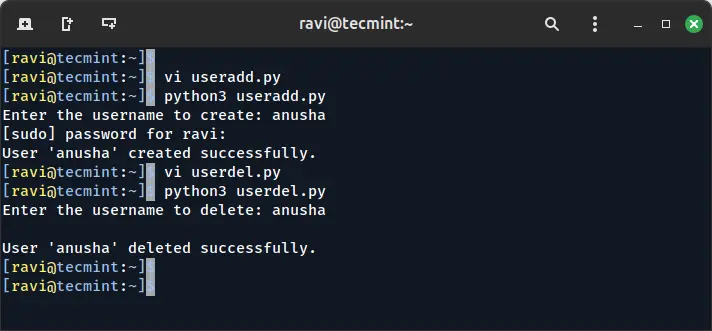
下面是一个简单的 Python 脚本,可以自动执行添加新用户的过程:
import subprocess

def create_user(username):
    try:
        # Create a user using the useradd command
        subprocess.run(['sudo', 'useradd', username], check=True)
        print(f"User '{username}' created successfully.")
    except subprocess.CalledProcessError:
        print(f"Failed to create user '{username}'.")

if __name__ == "__main__":
    user_name = input("Enter the username to create: ")
    create_user(user_name)
删除用户
要删除用户,您可以使用类似的方法。
import subprocess

def delete_user(username):
    try:
        subprocess.run(['sudo', 'userdel', username], check=True)
        print(f"User '{username}' deleted successfully.")
    except subprocess.CalledProcessError:
        print(f"Failed to delete user '{username}'.")

if __name__ == "__main__":
    user_name = input("Enter the username to delete: ")
    delete_user(user_name)
2. 自动化文件管理
自动执行文件管理任务(例如文件创建、删除和权限更改)是减少手动工作的好方法。
检查文件是否存在
这是一个简单的脚本,用于检查特定文件是否存在并相应地打印消息:
import os

def check_file_exists(file_path):
    if os.path.exists(file_path):
        print(f"The file '{file_path}' exists.")
    else:
        print(f"The file '{file_path}' does not exist.")

if __name__ == "__main__":
    file_path = input("Enter the file path to check: ")
    check_file_exists(file_path)
更改文件权限
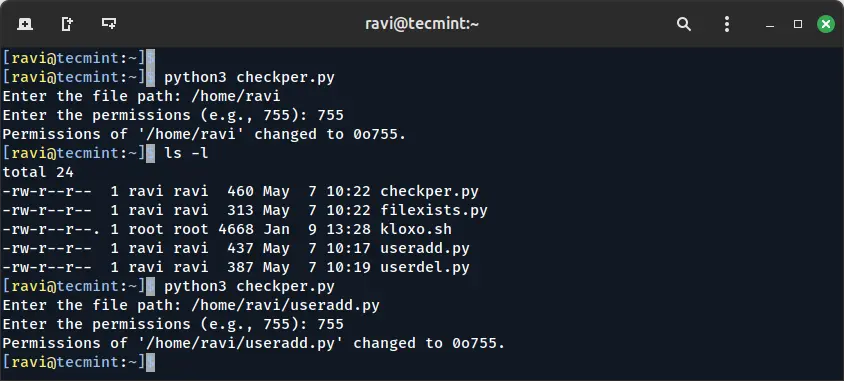
您还可以使用 Python 自动更改文件权限os.chmod()函数,它允许您修改文件权限:
import os

def change_permissions(file_path, permissions):
    try:
        os.chmod(file_path, permissions)
        print(f"Permissions of '{file_path}' changed to {oct(permissions)}.")
    except Exception as e:
        print(f"Failed to change permissions: {e}")

if __name__ == "__main__":
    file_path = input("Enter the file path: ")
    permissions = int(input("Enter the permissions (e.g., 755): "), 8)
    change_permissions(file_path, permissions)
3. 自动化系统监控
Python 脚本可用于监控系统性能并在出现问题时生成警报。
监控磁盘使用情况
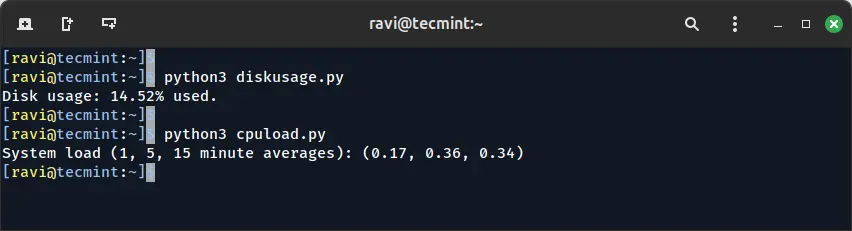
这shutil模块可以帮助您检查根文件系统上的可用磁盘空间,并在磁盘使用量超过阈值时打印警告。
import shutil

def check_disk_usage(threshold=80):
    total, used, free = shutil.disk_usage("/")
    used_percent = (used / total) * 100

    print(f"Disk usage: {used_percent:.2f}% used.")

    if used_percent > threshold:
        print("Warning: Disk usage is above the threshold!")

if __name__ == "__main__":
    check_disk_usage()
监控系统负载
您还可以使用 Python 监控 CPU 负载psutil库(可能需要安装):
pip install psutil
安装后,使用它来获取系统负载:
import psutil

def check_system_load():
    load = psutil.getloadavg()
    print(f"System load (1, 5, 15 minute averages): {load}")

    if load[0] > 1.5:
        print("Warning: High system load!")

if __name__ == "__main__":
    check_system_load()
4. 自动化系统备份
备份是系统管理的重要组成部分,您可以使用 Python 自动执行文件备份shutil模块。
备份目录
该脚本通过使用以下命令将目录复制到指定位置来自动备份目录shutil.copytree()。
import shutil
import os

def backup_directory(source_dir, backup_dir):
    try:
        # Create backup directory if it doesn't exist
        if not os.path.exists(backup_dir):
            os.makedirs(backup_dir)

        backup_path = os.path.join(backup_dir, os.path.basename(source_dir))
        shutil.copytree(source_dir, backup_path)
        print(f"Backup of '{source_dir}' completed successfully.")
    except Exception as e:
        print(f"Failed to backup directory: {e}")

if __name__ == "__main__":
    source_directory = input("Enter the source directory to back up: ")
    backup_directory_path = input("Enter the backup destination directory: ")
    backup_directory(source_directory, backup_directory_path)
结论
使用 Python 自动执行系统管理任务可以节省您的时间并减少人为错误。从管理用户到监控系统运行状况和创建备份,Python 脚本为管理员提供了灵活而强大的解决方案。
您可以根据您的具体需求修改和扩展这些脚本。 Python 的易用性和广泛的库支持使其成为在 RHEL 和 Linux 上自动执行各种系统管理任务的优秀工具。。