
作为开发人员,我们经常坚持使用我们喜欢的内置Python功能,有时甚至为已经具有有效内置解决方案的问题编写自定义解决方案。但是,Python的标准库充满了隐藏的宝石,可以简化我们的代码并提高性能。
在本文中,我们将探讨一些鲜为人知但非常有用的Python功能,值得更多关注。
1。二等 - 有效排序的列表操作
这bisect模块有助于维护排序的列表并有效地查找插入点,当您需要快速查找或动态排序序列时,这特别有用。
示例:等级跟踪系统
让我们实现一个保持分类成绩,查找插入点并动态确定字母成绩的系统。
from bisect import bisect_left, bisect_right, insort

grades = [60, 70, 75, 85, 90, 95]

# Find the correct position to insert a new grade
new_grade = 82
position = bisect_left(grades, new_grade)
print(f"Insert 82 at position: {position}")

# Insert while keeping the list sorted
insort(grades, new_grade)
print(f"Grades after insertion: {grades}")

# Assign letter grades based on score
def grade_to_letter(score):
    breakpoints = [60, 70, 80, 90]  # F, D, C, B, A
    grades = 'FDCBA'
    position = bisect_right(breakpoints, score)
    return grades[position]

print(f"Score 82 gets grade: {grade_to_letter(82)}")
print(f"Score 75 gets grade: {grade_to_letter(75)}")

2。itertools.pairwise - 过程连续对很容易
这pairwise函数以序列生成连续的对,使其非常适合趋势分析,计算差异和平滑数据。
示例:温度变化分析
分析温度数据时,我们通常需要计算连续读数,查找趋势或计算移动平均值之间的差异。而不是用基于索引的逻辑手动迭代,而是pairwiseItertools的功能使我们能够轻松地处理连续对。
from itertools import pairwise

temperatures = [20, 23, 24, 25, 23, 22, 20]

# Compute temperature differences
changes = [curr - prev for prev, curr in pairwise(temperatures)]
print("Temperature changes:", changes)

# Compute moving averages
moving_averages = [(t1 + t2) / 2 for t1, t2 in pairwise(temperatures)]
print("Moving averages:", moving_averages)

# Find the largest temperature jump
max_jump = max(abs(b - a) for a, b in pairwise(temperatures))
print(f"Largest temperature change: {max_jump} degrees")

3。统计。FMEAN - 快速而精确的浮点平均值
这fmean函数计算平均速度更快,更高的精度mean(),非常适合大型数据集。
示例:均值()与fmean()的速度比较
该示例演示了Python统计模块的两个功能之间的性能比较:mean()和fmean()。
from statistics import mean, fmean
import time

temperatures = [21.5, 22.1, 23.4, 22.8, 21.8] * 100000

# Regular mean
start_time = time.perf_counter()
regular_mean = mean(temperatures)
regular_time = time.perf_counter() - start_time

# fmean
start_time = time.perf_counter()
fast_mean = fmean(temperatures)
fast_time = time.perf_counter() - start_time

print(f"Regular mean: {regular_mean:.10f} (took {regular_time:.4f} seconds)")
print(f"fmean: {fast_mean:.10f} (took {fast_time:.4f} seconds)")

fmean明显更快,尤其是对于大型数据集。
4。itertools.takewhile - 处理直到条件失败
这takewhile功能有助于处理序列,直到不再满足条件,从而提供一种更清洁的打破循环方式。
示例:处理日志直到发生错误
此示例演示了如何有效地处理日志条目,直到使用Python的错误遇到错误itertools.takewhile功能。目标是提取并显示在日志列表中第一个错误条目之前发生的所有日志条目。
from itertools import takewhile

log_entries = [
    "INFO: System started",
    "INFO: Loading data",
    "INFO: Processing users",
    "ERROR: Database connection failed",
    "INFO: Retrying connection",
]

# Retrieve logs until the first error
normal_operation = list(takewhile(lambda x: not x.startswith("ERROR"), log_entries))
print("Logs before first error:")
print("\n".join(normal_operation))

5。运算符。attrgetter - 有效检索对象属性
这attrgetter功能简化了从对象中提取属性,尤其是用于排序和嵌套属性。
示例:用作者对博客文章进行排序和视图
该代码演示了如何使用Python的多个标准对博客文章列表进行排序sorted()通过操作员模块的attrgetter实用程序功能。
排序首先由作者的名称(字母顺序)执行,然后由视图数(数值)执行。当您想通过层次组织数据(例如作者对文章进行分组并根据受欢迎程度进行排名)时,这种方法很有用。
from operator import attrgetter
from datetime import datetime

class Article:
    def __init__(self, title, author, views, date):
        self.title = title
        self.author = author
        self.stats = type('Stats', (), {'views': views})
        self.date = date

    def __repr__(self):
        return f"{self.title} by {self.author}"

articles = [
    Article("Python Tips", "Alice", 1500, datetime(2025, 1, 15)),
    Article("Data Science", "Bob", 2500, datetime(2025, 1, 20)),
    Article("Web Dev", "Alice", 1800, datetime(2025, 1, 10))
]

# Sort by author and then by views
sorted_articles = sorted(articles, key=attrgetter('author', 'stats.views'))
for article in sorted_articles:
    print(f"{article.author}: {article.title} ({article.stats.views} views)")

6。itertools.chain.from_iterable - 有效的嵌套列表
这itertools.chain.from_iterable函数是Python的Itertools模块中功能强大的工具,它允许您扁平嵌套的峰值结构(例如,列表列表,,,,元组等等)以记忆有效的方式成单个触觉。
与其他扁平方法不同,例如列表综合或嵌套循环,chain.from_iterable避免创建中间列表,使其对于处理大型数据集特别有用。
示例:销售数据扁平
此示例演示了如何使用Python有效地将嵌套列表结构弄平itertools.chain。该方案涉及代表的销售数据列表,其中每个分子列表包含代表每月销售数字的元组。
目标是“扁平”该嵌套结构成一个单元列表,以便于处理或分析。
from itertools import chain

sales_data = [
    [('Jan', 100), ('Feb', 150)],
    [('Mar', 200), ('Apr', 180)],
    [('May', 210), ('Jun', 190)]
]

# Flatten data efficiently
flat_sales = list(chain.from_iterable(sales_data))
print("Flattened sales data:", flat_sales)

7。函数室。CACHE - 自动功能缓存
这cache装饰器(在Python 3.9中引入)存储功能结果以加快重复计算的速度,非常适合递归或昂贵的计算。
示例:斐波那契序列优化
此示例说明了如何functools.cache`通过存储先前计算的结果来显着提高性能。它没有重新计算每个递归调用的值,而是检索缓存的结果,使诸如FibonAcci计算的功能呈指数更快。
from functools import cache

@cache
def fibonacci(n):
    if n < 2:
        return n
    return fibonacci(n - 1) + fibonacci(n - 2)

print(fibonacci(30))  # Much faster than an uncached version
输出:
832040
8。ContextLib.Suppress - 清洁剂的异常处理
这suppress当您想忽略特定异常而没有不必要的样板代码时,功能是Try-Except的更清洁替代方法。
示例:抑制文件找不到错误
此示例试图打开可能不存在的文件。而不是提出filenotfounderror, 这suppress()功能静静地处理它,使程序可以继续而不会中断。
from contextlib import suppress

with suppress(FileNotFoundError):
    with open("non_existent_file.txt", "r") as file:
        data = file.read()

print("No crash, program continues!")
输出:
No crash, program continues!
9。Pathlib.path.glob - 直观文件搜索
这glob()方法pathlib.Path允许您搜索与目录中特定模式匹配的文件。使用rglob()启用递归搜索,这也意味着它也通过所有子目录,这对于诸如此类的任务很有用在项目文件夹中,无需手动检查每个目录。
示例:递归查找所有Python文件
此示例使用Path.rglob("*.py")递归搜索所有Python文件(.py)在当前目录及其子目录中。结果是文件路径的列表,使其易于管理或处理多个Python脚本。
from pathlib import Path

python_files = list(Path(".").rglob("*.py"))
print("Found Python files:", python_files)

10。dataclasses.asdict - 轻松将对象转换为字典
这asdict()来自数据级别的功能简化了将对象转换为字典,使其使它们可json serializizizizizizizizable或易于操纵。
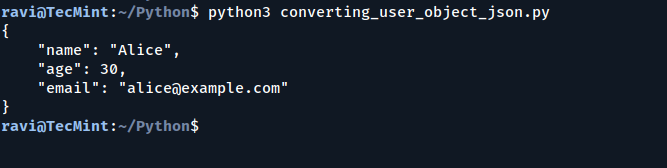
示例:将用户对象转换为JSON
变换adataclass对象成词典,使其易于序列化为JSON。
from dataclasses import dataclass, asdict
import json

@dataclass
class User:
    name: str
    age: int
    email: str

user = User("Alice", 30, "")
user_dict = asdict(user)

print(json.dumps(user_dict, indent=4))  # Easily convert to JSON
结论
这些鲜为人知的Python功能简化了复杂的操作,同时提高了可读性和效率。尝试将它们集成到您的项目中,您会惊讶于您的代码变得更加清洁和更快!